Today, email communication is one of the most usable modes of communication by working professionals and home users. So people use different email clients for a better experience in email communication. People keep switching from one email client to another, and one such switch is from Lotus Notes to Windows Live Mail. In this blog, we have explained an automated method to export Lotus Notes to Windows Live Mail.
Overview
IBM Notes or HCL Notes uses the NSF file format to store emails, contacts, calendars, tasks, notes, etc. It is a client application that works by connecting with Lotus Notes or HCL Domino Server and facilitating communication and workflow within an organisation.
Windows Live Mail is a free email client that manages emails, contacts, calendars, tasks, notes, etc in the EML file format with an internet connection. It was discontinued for use in 2012, and no update has been launched by Microsoft since then.
Reasons to export Lotus Notes to Windows Live Mail
- There may be various reasons to export Lotus Notes to Windows Live Mail, and one is that Lotus Notes uses advanced features, making it complicated for a normal user to use it.
- If a user shifts from one organisation to another organisation where Windows Live Mail is used, and the user wants to shift all emails from the previous organisation where Lotus Notes is used.
- Windows Live Mail uses the EML file format, and this file format is supported by many email clients like Microsoft Outlook, Mozilla Thunderbird, Apple Mail and eM Client.
- Lotus Notes uses an advanced interface, making it difficult for non-technical people to use it; however, Windows Live Mail has a simple and intuitive graphical interface that can be used by anyone easily.
Automated method to export Lotus Notes to Windows Live Mail
With eSoftTools NSF to EML converter software, you can easily convert NSF files to the EML file format that is used by Windows Live Mail. This tool allows users to convert NSF files to different file formats like EMLX, HTML, MSG, MBOX, PDF, vCard (for contacts only), CSV (for contacts only), Zimbra(.tgz) and ICS (for calendar only). Moreover, this tool allows migrating NSF files to cloud applications like Gmail, Yahoo and Office 365.
Key features
- Preserves all formatting and structuring of Lotus Notes emails during conversion and migration.
- At a single time can convert single or multiple NSF files to different file formats.
- Preview all NSF data items like emails, calendars, contacts, tasks, notes, etc in the preview panel.
- Require a Lotus Notes application installed on your PC to perform NSF to EML conversion.
- Compatible with all editions of the Windows Operating System, like Windows 11, 10, 8.1, 8, 7 & below editions.
- Works with all editions of Lotus Notes or HCL Notes (10.0.1, 9.0.1, 9.0, 8.5, 8.0.2, 7.0, 6.5, & 6.0).
- Have a Mail filter feature that filters emails according to Date.
- Save the converted file to your desired location on your Windows System.
Also Read: How to Export Windows Live Mail Emails to Lotus Notes?
Steps to export Lotus Notes to Windows Live Mail
- Download, install and launch eSoftTools NSF to EML converter software on your Windows PC.
- Press the Select NSF button on the above menu bar to add NSF files into the software.

- A new window will open, and select the NSF file conversion mode- Single NSF file conversion or Bulk NSF file conversion.
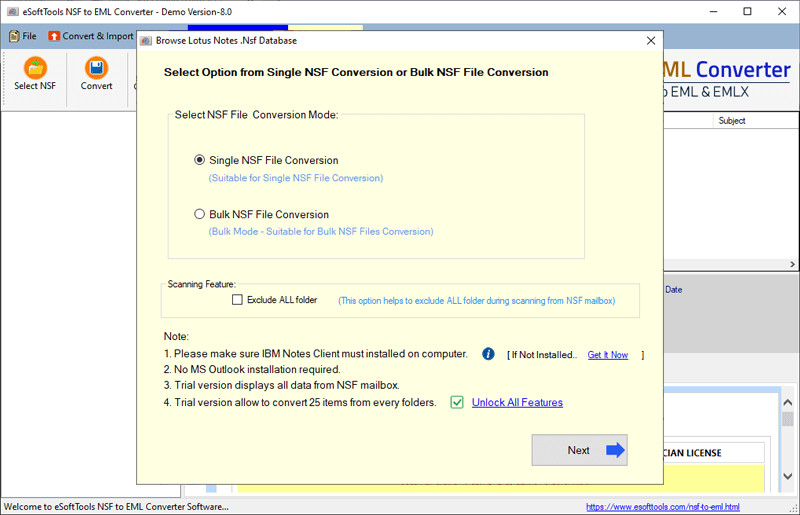
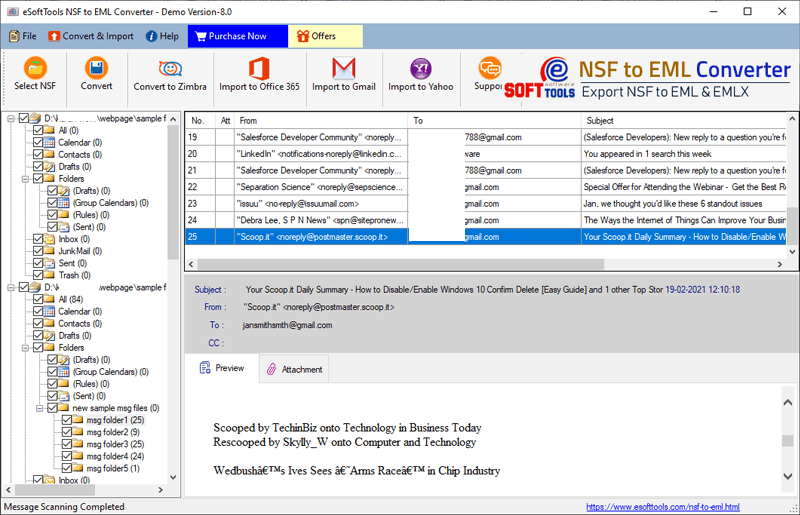
- Click the Next button, and a preview of NSF files and folders will be shown in the preview panel.
- Choose the needed files & folders to be converted and click the Convert button on the above menu bar.
- Choose the Lotus Notes conversion option as an EML file by selecting the radio button.
- Apply mail filter, naming convention and saving location according to your requirements.
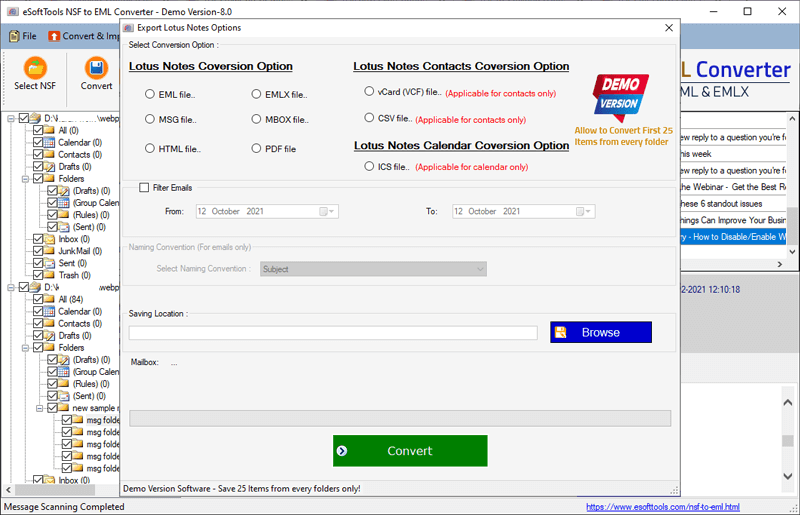
- At last, click the Convert button and start the conversion process from NSF files to EML files.
Note: After converting NSF files to EML files, you can easily open them in Windows Live Mail.
Conclusion
In this article, we have described reasons and an automated method, step by step, to export Lotus Notes to Windows Live Mail. There are manual methods also available, but they are not applicable in Bulk conversion. If you want to convert NSF files to EML files in bulk, then use the automated method. If you want to check the working of the software, then try the free demo version of the software.

No Comments yet!