Firstly, Lotus Notes emails are NSF files. Lotus Notes emails are run on the software IBM Lotus, which HCL now maintains. Therefore, Gmail is a cloud-based application that can be used anywhere in the world with the help of the Internet. Therefore, users can access emails on Gmail anywhere in the world with the help of the internet.
Do you need to migrate NSF files to web based email clients? Then read this blog. Hence, we have provided a professional solution for migrating NSF files from your computer to web based email clients.
Why to import Lotus Notes Emails to Gmail Account?
- Lotus Notes Emails are run on the HCL Notes which is complex software whereas web email clients have an easy graphical interface that can be used by anyone.
- If you have old NSF files on your computer and you don’t have any software installed on your computer then you can migrate these NSF files to web-based email clients.
- If HCL Notes get corrupted and stop working then you can get these files by transferring these files to web based email clients.
You Can Also Read: How to Convert NSF to PST?
Method to migrate Lotus Notes Emails to Web based email client such as Gmail
Therefore, you can migrate Lotus Notes Emails to Gmail Account with the help of eSoftTools Lotus Notes to Gmail migrator Software. Moreover, it allows you to transfer single and multiple NSF files at a time. Therefore, in the preview panel, you can see the files and folders of NSF files in tree format. Thus, you can check and uncheck the NSF files that you want to migrate to your Gmail account.
- Download and install eSoftTools Lotus Notes to Gmail migrator Software.
- Choose NSF file and single and multiple NSF files at a time
- Automatically it scans NSF files and in the preview panel you can see the files and folders of NSF files.
- Check the files and folders you want to import to Gmail in the side panel.
- Now hit the ‘Import to Gmail’ option.
- Next, enter the User ID and Password of a Gmail account.
Press ‘Convert & Import’ button to convert and migrate NSF files to Gmail account.
Firstly, Steps to Know How to Migrate Lotus Notes Database Mailbox Item
First Step: Open the Software

Second Step: Select NSF File
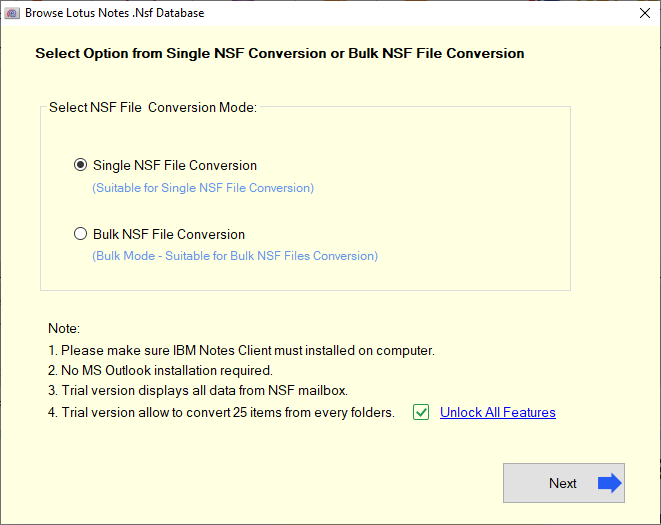
There are two types of mode to select NSF file:-
1) Single NSF File

2) Bulk NSF File Conversion

Third Step: After selecting the NSF file, start the scanning process:

Fourth Step: Now, click on the convert button and get the conversion

Frequently Asked Questions (FAQ)
Ans. eSoftTools NSF to Gmail Converter tool designed for converting Lotus Notes file as Gmail with the original folder structure.
Ans. Thus, this software supports bulk conversion of NSF file.
Ans. Therefore, HCL Lotus Notes must be installed and properly configured.
Ans. Yes, our support team helps you 24/7
Ans. Additionally, the software provides a free DEMO version that allow users to scan and preview of NSF files.
Conclusion
Therefore, you can easily migrate Lotus Notes files to a Gmail account with the help of eSoftTools NSF to Gmail converter Software. Therefore, technical and non-technical people can use this software easily. Hence, you can try the demo version of this software in which you can convert 25 files from each folder of a NSF file and come to know the features of this software. You can also use eSoftTools NSF files to Office 365 to migrate files from NSF database to Office 365 by providing the logging details.

No Comments yet!