Are you looking for a method to migrate emails from Libero Mail to Gmail, or do you want to export emails, contacts, and calendars from Libero Mail to your Gmail account? If yes, then you are on the right page. In this blog, users will find a professional method to migrate emails from Libero Mail to Gmail.
Libero is an Italian-based company that provides a web portal and internet services to its users and is owned by Italiaonline. It provides various types of services, such as webmail, search engine, news, videos, and others, for its business and home customers.
Libero Mail is an email service provided by Italiaonline that provides a free email account. It provides an email address under the name username@libero.it.
Why do users want to import Libero Mail to Gmail?
There can be professional or personal reasons to import Libro Mail to Gmail for users, but some advantages and reasons to import Libro Mail to Gmail are explained below.
- Intuitive Interface: Gmail provides an interface that can be used by technical and non-technical people easily. Its interface is easy to use, which is why there are millions of Gmail users.
- Large storage space: Gmail provides 15 GB of storage space to store emails, contacts, calendars, etc. Users who have a large mailbox can store it in their Gmail account easily.
- Useful services: Gmail provides other useful services like Google Sheets, Google Calendars, Google Docs, Google Drive, etc. that users can use along with their Gmail account.
- Closure of Libero Mail account: If users of the Libero Mail account want to close their account, then they can store Libero emails in their Gmail account for future use.
Also Read:- How to Import IMAP Email Into Gmail
Manual method to migrate email from Libero Mail to Gmail
This method will import all emails from Libero Mail to the Gmail account by the built-in feature in the Gmail email account.
- Open the Gmail website on a web browser.
- Log in to your Gmail account by inputting your account credentials, such as username and password.
- Click on the Gear icon in the top right corner.
- Click on the See all settings button and press the Account and Import tab.
- Click on the Add a mail account button and your Libero email address, for example, username@libero.it.
- Click on Next and select the option Import emails from my other account (POP3).
- Click Next and provide Libero Mail login details
- Username: – Your Libero email address, like username@libero.it
- Password: – Enter the password of your Libero Mail email account.
- POP Server: – popmail. libero.it
- Port(POP3): 995
Always use a secure connection, SSL
- At last, click the Add Account button, and Gmail will fetch emails from Libero Mail to the inbox of the Gmail account.
Professional method to import email from Libero to a Gmail account
The easy and smart method to import emails from Libero to a Gmail account is to use eSoftTools IMAP Backup and migration software. With a few clicks, it can migrate emails from the Libero to the Gmail account in a few steps.
Moreover, this tool preserves the data structure and email formatting during migration to a Gmail account. Apart from migration, this tool backs up the IMAP email account mailbox folders in different file formats, like PST, EML, EMLX, HTML, MSG, MBOX, PDF, and Thunderbird.
Steps to import email from Libero to a Gmail account
- Download and install the eSoftTools IMAP Backup & Migration software on your Windows System.
- Select the IMAP server option from the drop-down menu in the Choose IMAP Server field.

- Enter your Libero Mail email account credentials, like email address, password, and IMAP details like
- IMAP server: imail. libero.it
- Port: 993
- Software will connect with the IMAP server and load Libero mailbox folders in the software.

- Preview the Libero Mail mailbox folders and select the folders that are required for migration.

- Click on the Import to Cloud button and select the Import into Gmail option from the list of options.

- Click Next, and the Import to Gmail or Google Workspace screen will open.
- Enter the Gmail email address and the Google Application Password in the required fields.
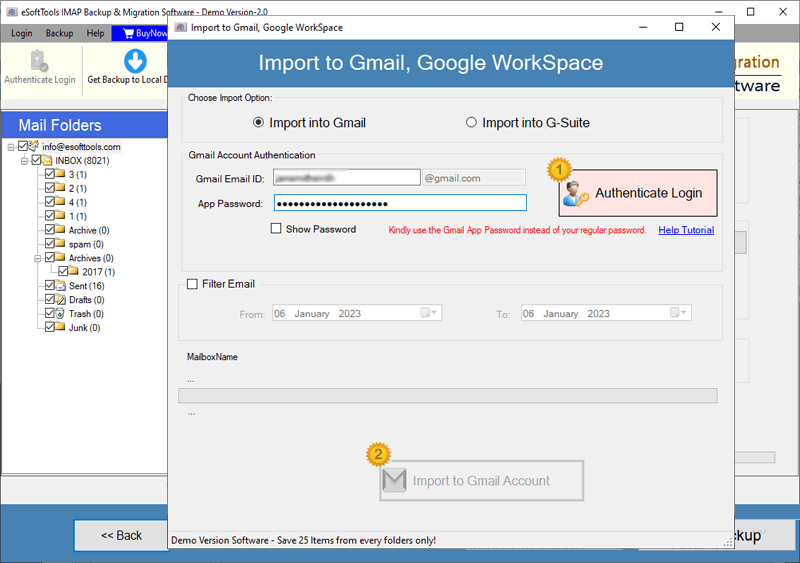
- Apply the filter email feature if you want to filter emails according to Date.
- At last, click the Import to Gmail button, and the software migrates all folders from the Libero Mail email account to Gmail.

Why use IMAP Backup and Migration software?
The eSoftTools IMAP Backup & Migration software provides various benefits to its users, and some of the advantages are explained below
- Backup emails in multiple file formats: IMAP Backup & Migration software can backup IMAP email accounts in multiple file formats, like PST, EML, EMLX, HTML, PDF, MSG, MBOX, and Thunderbird.
- Migrate emails to cloud applications: This tool can migrate IMAP account emails to cloud-based applications like IMAP to Gmail, Yahoo Mail, Office 365, Outlook.com, and other IMAP email accounts.
- Custom saving location: In this software, users can save the converted file to their defined location on the computer.
- Intuitive Graphical Interface: The graphical interface is designed such that anyone without technical knowledge can use this software. With a few clicks, this tool can back up or migrate your IMAP emails.
- Filter email: This tool can select emails according to Date with the filter feature.
Conclusion
Backing up and migrating emails from the Libero email account is important to save important emails and communicate in a better way. The eSoftTools IMAP Backup and Migration software offers a better way to back up Libero Mail emails in different file formats like PST, MSG, MBOX, etc. Apart from backup, it migrates Libero Mail emails to different cloud applications like Gmail, Yahoo Mail, Office 365, Outlook.com, and IMAP email accounts.
FAQs
Q. Can I use this software on any edition of the Windows Operating System?
Ans. Yes, this software can work on all editions of the Windows operating system, like Windows 11, 10, 8.1, 8, 7 & below editions.
Q. Does this tool work on the Mac Operating system?
Ans. No, this software does not work on the Mac Operating system. It is only compatible with the Windows operating system. The user can back up Libero Mail account folders in the EMLX files and use them in Apple Mail.
Q. Will this tool migrate selective emails from the Libero Mail to Gmail?
Ans. Yes, in the preview panel, it shows all the folders of the Libero Mail in the tree structure, and the user can select the folders that they want to migrate to Gmail.
Q. Can I import Libero Mail to Outlook with this software?
Ans. Yes, this software allows users to take a backup of Libero Mail in the PST files and use the PST files in Microsoft Outlook.
Q. Is an internet connection required for migration using this tool?
Ans. Yes, an internet connection is required to migrate Libero Mail emails to cloud applications like Gmail, Yahoo Mail, Outlook.com, Office 365, and other IMAP email accounts.


No Comments yet!