An OST file is a local copy of an Outlook mailbox that is on an Exchange Server. These files enable users to access Outlook mailboxes without an internet connection or when the internet is not available, allowing them to work in offline mode. However, in some situations, users want to convert OST files to HTML format. In this blog, we have explained an automated method to transfer OST file emails to HTML format.
Overview
OST (Offline Storage Table) stores Outlook emails, contacts, calendars, tasks, events, etc, in the offline mode and synchronises with the Exchange Server with the help of the internet.
HTML (Hypertext Markup Language) is a file that contains web page items like images, paragraphs, headings, etc, in a well-structured way. These files open in a web browser like Google Chrome, Microsoft Edge, Internet Explorer, etc. and edited with text-editor software like Notepad.
Reasons to transfer OST file emails to HTML format
- Good Overall Presentation: Emails in an HTML format opened in web browsers like Google Chrome, Microsoft Edge, Internet Explorer, etc. are well presented and have a good reading experience.
- Cross-platform accessibility: HTML files can be opened in a web browser like Google Chrome, Microsoft Edge, or Internet Explorer, which can be accessed on different platforms like desktop computers, tablets, laptops or mobiles.
- Better sharing options: HTML files are easily shareable, and users can share them with friends and colleagues.
- Backup and archiving purposes: HTML files are smaller in size and can be used for backup purposes.
Also Read: How to Open OST Files in Outlook 365?
An automated method to transfer OST file Emails to HTML format
With eSoftTools OST to PST converter software, you can easily transfer OST file Emails to HTML format. You can convert an OST file to HTML format without the installation of Outlook on your system. This automated method preserves email formatting, structure and properties during conversion.
Best and Attractive features of the software
- Easily converts inaccessible, orphans, and encrypted OST to EML files.
- Converts multiple OST files to HTML format at a time.
- Provides a preview of OST emails and files/folders of the mailbox inside the software.
- Allows to convert OST files to HTML format and other file formats such as MBOX, EMLX, EML, MSG, TGZ, PST, etc.
- Capable of migrating OST files to cloud applications like Microsoft 365 (Office 365), Outlook.com, Gmail, Yahoo Mail, and IMAP applications.
- Supports OST files of all editions of MS Outlook 2021, 2019, 2016, 2013, 2010, 2007, and below editions.
- Consistent with all editions of the Windows Operating System, like Windows 11, 10, 8.1, 8, 7 & below versions.
- Have a simple and intuitive graphical interface that navigates the whole process in a few clicks.
Step-by-step approach to convert OST to HTML
- Download and launch the eSoftTools OST to PST Converter software on your system.
- Press the Select OST button on the above menu bar to add OST files to the software.
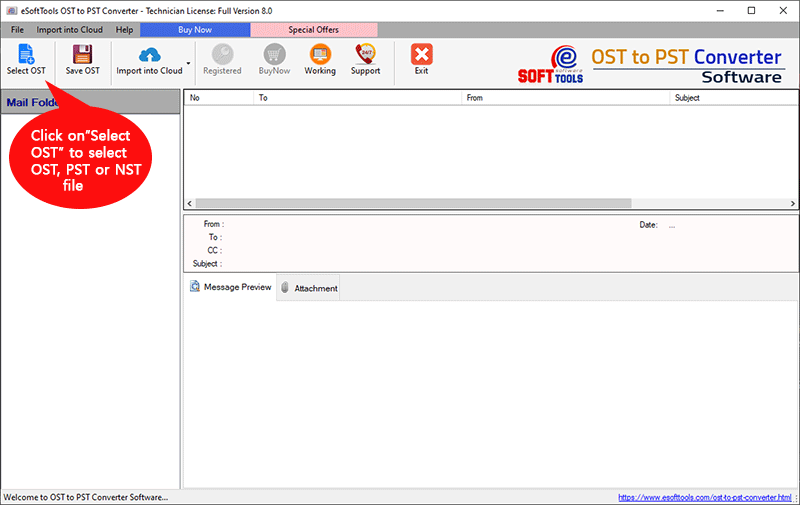
- Press the Select file button to add OST files into the software, and click on Start scanning process.
- Preview the loaded files and folders of the OST mailbox in the preview panel and select the files and folders to be converted into HTML format.
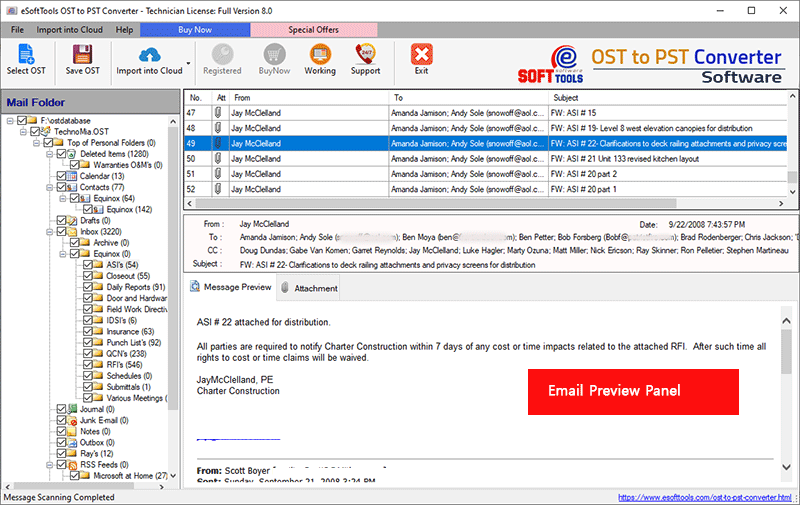
- Click on the Save OST button, and a new window will appear on the screen.
- Choose the Export to HTML option from the list of options seen in the drop-down menu.
- Apply Mail filtering and the Naming convention feature if you want to apply.
- Browse the Saving location where you want to save the resultant HTML files.

- Click on the Convert button and start the conversion process from OST to HTML files.
Conclusion
Many times, users want to convert OST files to HTML format. In this blog, we have described an automated method step by step that can help you in converting OST files to HTML format. If you want to try the software, you can use the free demo version of the software and check how the software works. In the demo version, you can convert 25 files of each OST data to other file formats.

No Comments yet!