You have an urge to convert an MBOX file to an EML file but you do not know how to do it. Then read this blog you will know manual and automated methods to Extract Emails MBOX to EML files.
MBOX – These various email clients, such as Mozilla Thunderbird, Apple Mail, and Entourage, use the MBOX file format. In this, all the emails of the mailbox are stored in a concatenated way i.e., one after the other. Moreover, the emails of the MBOX file are encrypted in an ASCII format, and attachments are encoded in other ways.
EML – EML means electronic mail. This file format is supported by even more email clients than email clients of MBOX. Additionally, in this file format, a single email is stored in one file.
Why convert MBOX to EML?
- Compatibility- Many email clients support EML files rather than MBOX files. Due to its compatibility, it is widely used.
- Email Management – In the EML file only a single email is stored whereas in the MBOX file, multiple emails are stored in a single file. So, it is easier to manage a single email in an EML file than to manage a single mail in an MBOX file.
- Easy sharing- It is easier to share a single email than to share a single email stored in multiple emails.
Methods to Convert MBOX to EML
- Manual Method
- Automated Method
Manual Method
Drag and Drop Method
- Download and Install Thunderbird software into your System.
- Open the mailbox of any profile that you selected.
- Create a New Folder at any location in your System.
- Simply drag the emails from the inbox and drop them to the New Folder.
- All the emails are now stored in an EML format in the New Folder.
Automated Method
In the automated method, we use third-party software such as eSoftTools MBOX converter software. Furthermore, it can load and convert single and multiple MBOX files to EML files at a time. It can convert MBOX files to other formats such as PST, MSG, HTML, EMLX, NSF, etc. It maintains the formatting and structure of emails during conversion. The software maintains the email attachments and headers while conversing. Meanwhile, you can preview the MBOX emails in the preview panel and check the emails that you want to convert to EML files. It also provides the feature of email filtering, by which you can filter emails according to date. Additionally, you can filter emails by specifying the start and end dates. However, in the demo version of the software, you can convert 25 files from each folder of MBOX files into EML files.
Steps to Know How to Export MBOX to EML File
- Download & Open the MBOX converter software

2. Click on the “Add File or Folder” button from the top menu
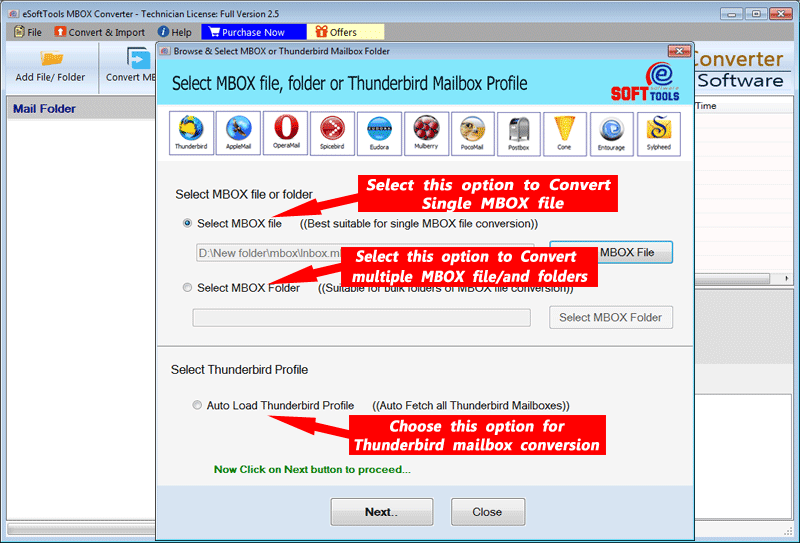
3. Check the live preview of email messages

4. Get conversion of MBOX File/Folder to PST, EML, MSG, EMLX, NSF, HTML

5. Select the file saving location
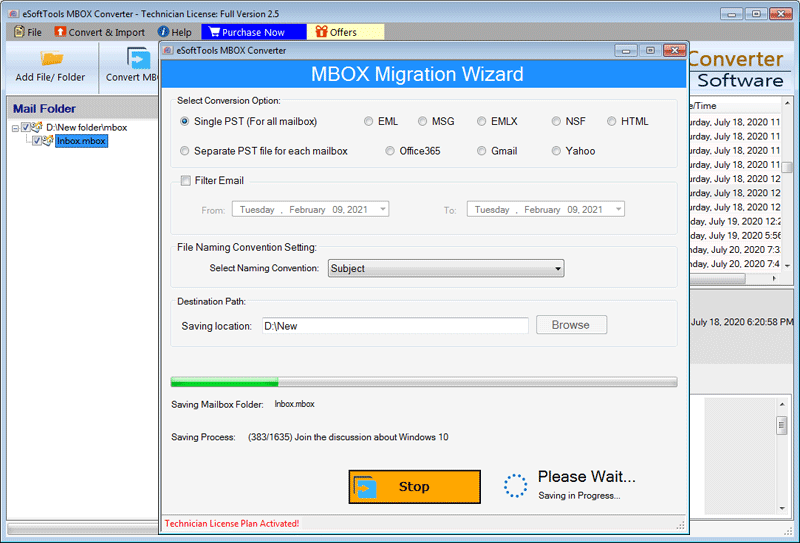
6. A pop-up will appear after completing the conversion process
Frequently Asked Questions
Ans. eSoftTools MBOX Converter Tool easily converts MBOX mailbox items into multiple email formats.
Ans. This software provides you best conversion of MBOX file as PST, EML, MSG, HTML, PDF, and other widely used formats.
Ans. Yes, the tool retains all email attachments in their original format successfully.
Ans. Yes, this software can export many MBOX files at a single time.
Ans. Yes, users can preview all emails, message properties, and attachments before conversion.
Ans. Yes, this tool is compatible with all major Windows versions, including Windows 11, 10, 8.1, and earlier editions.
Conclusion
Now you know both Manual and Automated methods, but in the manual method, there is a limitation that it is a time-consuming method. If you want to convert multiple MBOX emails to EML files, you have to drag and drop every single email. In the automated method, you can load multiple MBOX files into the software, and in a few seconds, it converts the MBOX files to EML files.

No Comments yet!