Nowadays many users want to export Windows Live Mail emails to Lotus Notes application. For such users, we have written this blog. Through this blog, you can easily export WLM emails to Lotus Notes.
Overview
Windows Live Mail is an email application provided by Microsoft. A large number of users use this application to access their email accounts. But now it has been discontinued.
Lotus Notes, now also known as HCL Notes, is a collaborative software platform that provides email, calendaring, document sharing, and workflow capabilities, all integrated in a client-server environment. Also, it allows users to save their email profile data locally and offers many more features similar to Windows Live Mail.
Smart solution to Export Windows Live Mail Emails to Lotus Notes
The easiest way to export Live Mail to Lotus Notes is by using eSoftTools Windows Live Mail Converter Software. With the help of this software, you can automatically load all WLM profile data and export them to NSF files. There will be no data loss and you can try the free demo of this software.
Also Read:- How to Import Windows Live Mail to Thunderbird?
Key Features of Windows Live Mail Converter Software
- Migrate unlimited emails from the WLM profile to Lotus Notes NSF with the help of this software.
- Export Windows Live Mail emails to Lotus Notes with just a few simple clicks.
- You can export emails from multiple WLM profiles to Lotus Notes NSF in a single process.
- This software allows exporting of selected folders from WLM profiles to NSF files.
- The graphical user interface of this software is very friendly so even non-technical users can use it easily.
- It supports all Windows O/S editions like 11, 10, 8.1, 8, 7, XP, and Vista.
Steps to Export Windows Live Mail Emails to Lotus Notes
- Download and launch the eSoftTools Windows Live Mail Converter software on your machine.

- Now from the first screen of the software, press the “Select WLM Mailbox” button.
- Next, choose the file selection method from the given options:- Auto-Detect Live Mail Store Location & Manually select Live Mail Store Location.
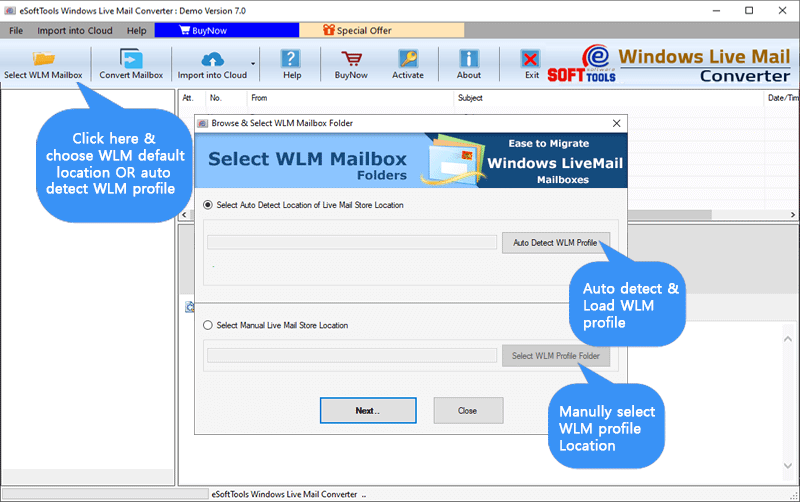
- After selecting and importing the WLM profile mail files, press the Next button.
- Now load all WLM profile email folders and items and get a preview of all email items.
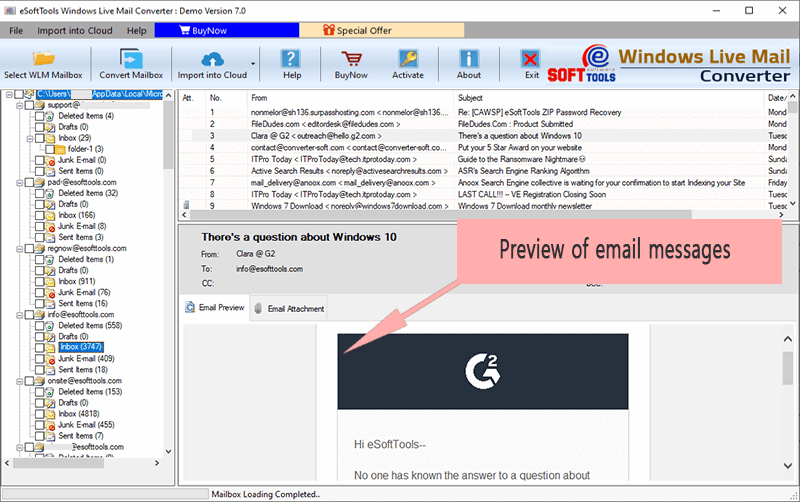
- Select the required mail folders and press the Convert Mailbox button from the menu bar.
- Now in the next open window, select “NSF” from the conversion options list.

- Use the mail filtering option to select the required dates to export specific emails.
- Select the location where you want to save the output files by pressing the Browse button.
- Finally, start the WLM email to NSF conversion by clicking the “Convert” tab.

Conclusion
In this blog, we have told you about the best solution that can help you export Windows Live Mail emails to Lotus Notes in the best way. You can also try the free demo of this software in which you can export up to 25 items from all your WLM folders.

No Comments yet!