Email communication has become a part of everyday life in today’s world. IBM Lotus Notes or HCL Notes is one of the email clients used for email communication but due to its complex structure and expensiveness, people search for an email client that is less expensive and more user-friendly. So, in this blog, we have explained an automated method to convert NSF to MBOX files with email & attachments.
Overview
One user-friendly and less expensive email client is Mozilla Thunderbird which uses the MBOX file format. MBOX files are supported by many email clients such as Mozilla Thunderbird, Apple Mail, Opera Mail, Sea Monkey, etc. This blog will tell you the method of migrating from Lotus Notes to Mozilla Thunderbird i.e. NSF to MBOX file format.
Why convert NSF to MBOX?
Lotus Notes email client is complex and costly. It is not affordable for small businesses and individual users on the other hand Mozilla Thunderbird is an open source program and free of cost.
NSF file is only supported by the IBM Domino server and Lotus Notes whereas MBOX file is supported by many email clients.
How to convert NSF to MBOX?
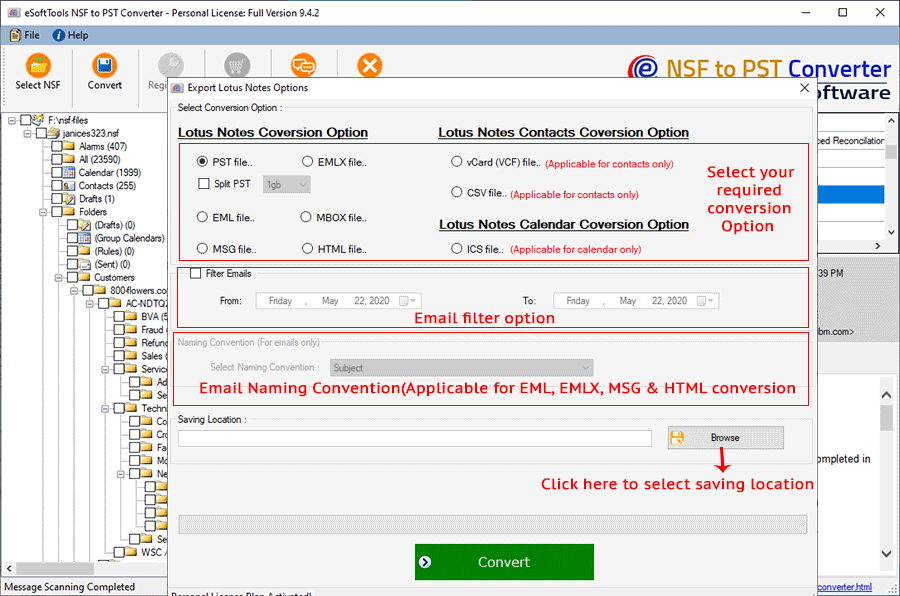
You can convert NSF files to MBOX using eSoftTools NSF to PST Converter software. You can add single or multiple NSF files into the software at a time. In the preview panel, you can view the NSF mailbox data files and folders and select the files and folders you want to export to MBOX files. Various email clients supports converted MBOX file. It retains the meta properties of the NSF emails and converts the NSF files of Lotus Notes 9.0 and below versions. With this software, you can convert the NSF files of any size to MBOX files.
Also Read: How to Convert NSF to EML?
Steps of Conversion
- Download and install eSoftTools NSF to PST Converter software.
- Click on Add NSF to add NSF files to the software.
- Select NSF files: You can load NSF files from the local computer.
- Search NSF Database: You can select the NSF files by searching from the NSF database.

- Select NSF files and folders that require conversion into MBOX files.
- Click the Start Scanning button to add NSF files to the software.
- You can preview the files and folders of the NSF files in the preview panel.

- Select the NSF files and folders you want to convert and click the Convert button.
Conclusion
Converting NSF files to MBOX files is a challenging task. You convert NSF files(used by Lotus Notes) to MBOX files(used by Thunderbird) and maintain file structures in different formats. You must use third-party software such as eSoftTools NSF to MBOX Converter software to convert NSF files to MBOX files. In the demo version, you can convert 25 files from each NSF folder into MBOX files.

No Comments yet!