Many users want to convert NSF to Zimbra TGZ file for various reasons. So this blog will help you. Here we will introduce the best way to quickly convert NSF to Zimbra TGZ file on a Windows computer.
Overview
Lotus Notes is the email client that most businesses use for email processing. It provides its users with a secure interface to send/receive important emails. But it is a paid application and its maintenance is also expensive for some users. Because of this, some Lotus Notes users now want to switch to Zimbra Desktop. Because it is a free email client.
Zimbra desktop is the best email application for all people in this world, but there is no possibility to move data directly from Lotus Notes to Zimbra. Because in Lotus, all the users’ account details and data are in NSF files, which do not work in the Zimbra application. So, users need to convert NSF files to a format that is compatible with Zimbra desktop.
Also Read:- How to Export Lotus Notes Contacts to CSV format?
Smartest technique to convert NSF to Zimbra TGZ files
A quick solution to convert Lotus Notes NSF to Zimbra TGZ is eSoftTools NSF to PST Converter software which users can use with complete security. Using this great utility, users can easily export NSF to TGZ file for Zimbra along with emails and attachment items. In a single process, users can convert a large number of NSF files to TGZ format. Also, the software also provides an option to export selected folders from NSF to TGZ files.
Key Features of NSF to PST Converter Software
- Convert NSF to Zimbra TGZ file with a very simple process.
- Export Lotus Notes NSF emails to Outlook PST, EML, EMLX, HTML, MBOX, PDF, and other formats.
- Convert a single NSF file and multiple NSF files to a Zimbra file simultaneously.
- Migrate Lotus Notes NSF File to Office 365, Gmail, Yahoo, & IMAP Accounts.
- Export NSF to Zimbra TGZ file without any problems or data loss.
- The graphical user interface of this software is free, which makes it easy for non-technical users to use it.
- This software works with all new and old Windows versions.
Steps to convert NSF to Zimbra TGZ file
- Download, install, and open eSoftTools NSF to PST Converter on a Windows-based computer.

- Click on the Select NSF button from the first screen of the software.
- Now choose single NSF file conversion or bulk NSF file conversion mode.
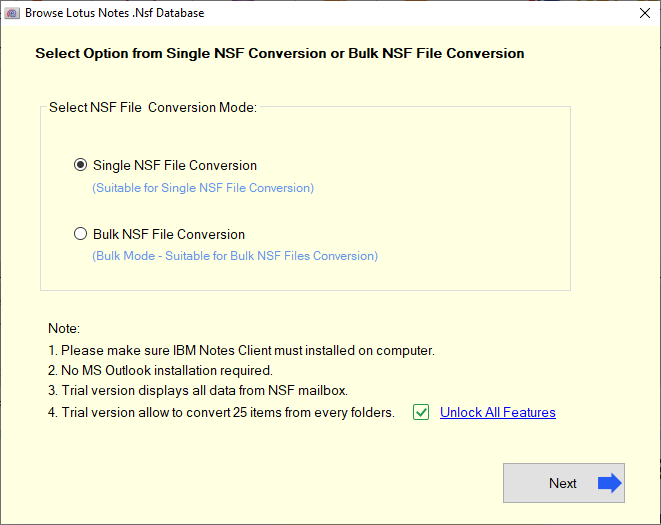
- Select and add the Lotus Notes NSF files for conversion and press the Start Scanning button.

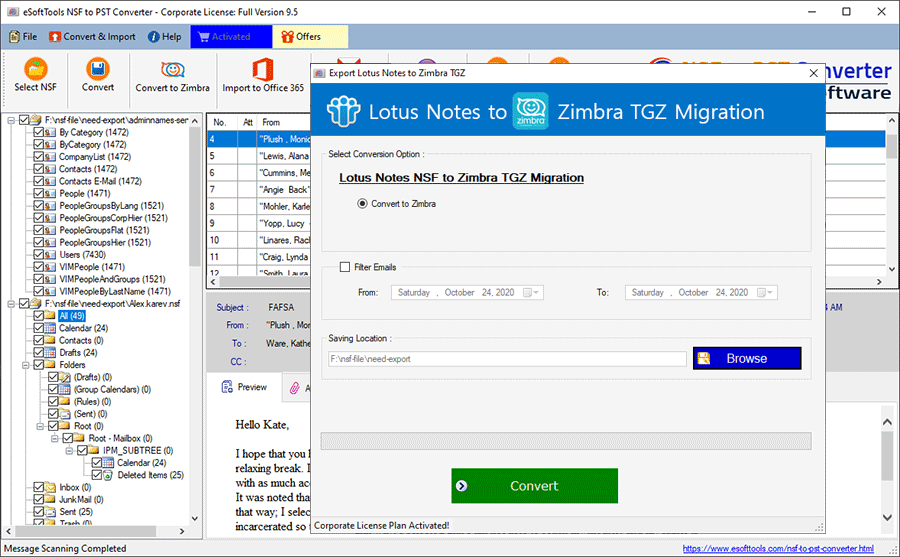
- Now, extract all the mail folders and other items from the NSF file and load them into the software.

- Get a preview of emails from NSF files and select the required folders from the NSF files.
- After selecting the folders, press the Convert to Zimbra button from the menubar.

- Use the mail filter option to select emails and choose the location where you want to save the resultant TGZ files after conversion.
- Now, press the Convert button and start the process of NSF to TGZ file conversion.
Conclusion
In this blog, we have told you the simplest way to convert NSF to a Zimbra TGZ file, so that you can very easily convert NSF to a Zimbra TGZ. You can also try the free demo of this software, in which you can export and save 25 items from all your folders for free.

No Comments yet!