We have discussed an easy and reliable method to export DBX to PST File Format and described an automated method to convert DBX to PST using DBX to PST converter software.
Overview
You need to perform a conversion when you switch from one email client to another. If the email clients use the same file format, you don’t need to perform a conversion. However, the situation becomes tricky when there are different file formats. And then you need to perform a conversion when you switch from Outlook Express to Microsoft Outlook.
Don’t worry in this blog you will learn the automated method to convert from Outlook Express to MS Outlook.
Difference between DBX and PST files
DBX Files
- Associated With: It is associated with Outlook Express which is now discontinued.
- File Type: It uses DBX files for database files storing emails in folders.
- Storage Method: Each folder in Outlook Express is stored as a separate dbx file
- Compatibility: It is limited to Outlook Express, and requires conversion to be opened in modern email clients
PST Files
- Associated With: It is associated with Microsoft Outlook which is still in use.
- File Type: It uses .pst(Personal Storage Table file) for storing the Outlook database.
- Storage Method: A single PST file can store emails, contacts, calendar data, and attachments.
How to export DBX to PST?
eSoftTools DBX to PST Converter software is one of the popular software for converting Outlook Express DBX to MS Outlook PST. It easily export DBX to PST File Format with 100% accuracy. This tool eases the process of converting Outlook Express DBX to MS Outlook PST and does conversion with a few clicks.
Steps to export DBX to PST
- Download and install eSoftTools DBX to PST converter software in your system.
- Click Add DBX files to add Outlook Express files into the software.

- Select the folder that contains DBX files and add them to the software.
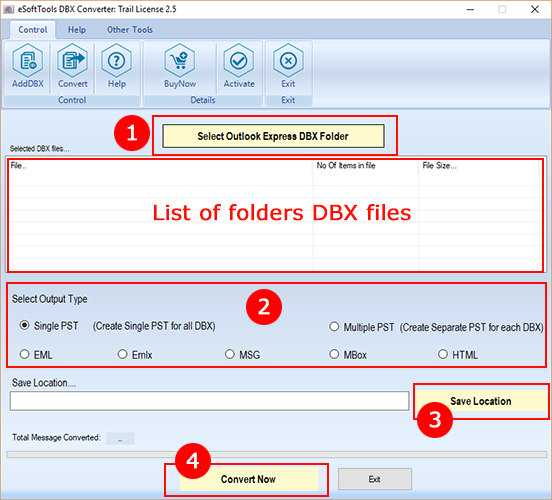
- Choose any one of these option file types for conversion
- Single PST: Create a single PST file and add emails of the DBX file in it.
- Multiple PST: Generate separate PST for saving emails of each DBX file separately.
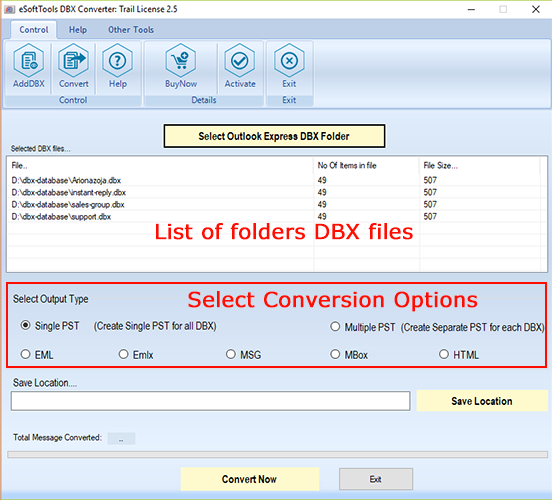
- Select the location to save the resultant PST file for conversion.
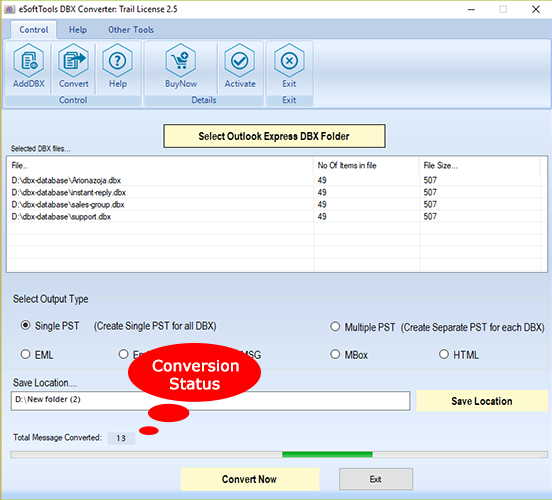
- Press the Convert Now button and convert Outlook Express DBX to PST.

Benefits and features to export DBX to PST
- Easily converts DBX files to PST and multiple other file formats.
- Converts DBX to PST in two distinct modes – Single PST or separate PST.
- Allows to choose the location on the computer to save the resultant converted file.
- Provides to convert DBX file of all Outlook Express editions.
- Operable on all editions of Windows Operating System like Windows 11, 10, 8.1, 8, 7, and below versions.
Conclusion
You can trust on this article, we discussed about how to export DBX to PST File Format? And it access your important emails in Microsoft Outlook and archive them for future purposes. By using professional software you can easily do conversion easily and save your valuable time and effort.

No Comments yet!