Are you looking to extract Outlook emails from MSG files and save them as EML? If so, you’ll find the best solution in this article. Here, we will explain the smartest way to securely export MSG files, including Outlook emails, to EML files. Let’s begin…
Overview
MSG and EML are two different file types that let you store email items locally. Each file format keeps individual emails and their information. With MSG and EML, you can store emails along with their attachments, message body, header fields, and more.
These two file formats serve the same purpose, yet they differ. A key distinction between MSG and EML is that MSG is exclusive to the MS Outlook email client, whereas EML works with numerous email programs.
Also Read:- How to Import MSG to Thunderbird in 2025?
Why Export MSG to EML files with Outlook Emails?
- Users require access to their Outlook items externally from MS Outlook. EML is a file type facilitating this. EML is a universally accessible file type, easily opened by users across various platforms.
- Users who need extra backups of their Outlook emails stored as MSG files often prefer saving them as EML files.
- When users switch from Outlook to another email platform, they also need to convert MSG to EML along with their old data.
Advanced Solution to Export MSG to EML files with Outlook Emails
The eSoftTools MSG to EML Converter software is a reliable method for securely exporting Outlook MSG emails to EML. This program is designed to automatically convert MSG to EML instantly. It simplifies the conversion process and exports emails from multiple MSG files to EML simultaneously. It accurately preserves all email information and properties during the conversion. You also get extra smart options such as mail filters, naming rules, and folder selection.
How to Export MSG to EML files with Outlook Emails?
- Download the EXE file of eSoftTools MSG to EML Converter software (Windows).

- Run this software on your computer and press the ‘Select MSG’ button.
- Select the “Select MSG Folder” or “Select MSG Files” option to add MSG.
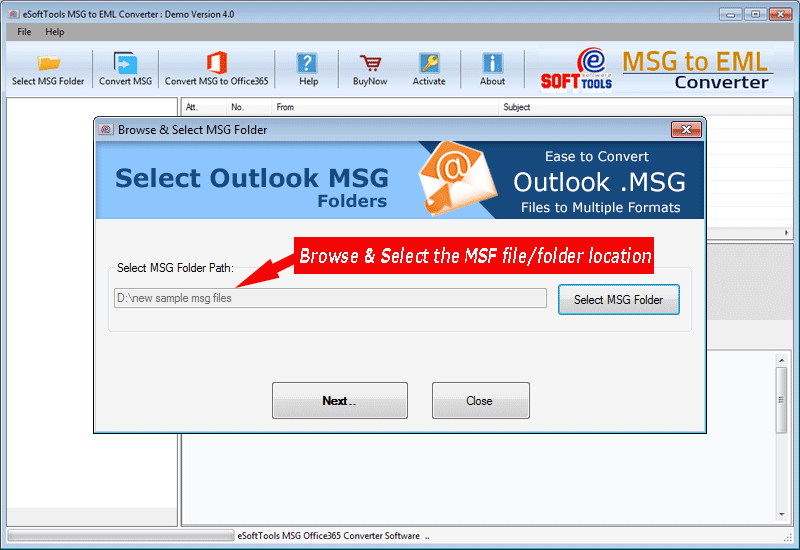
- Select the location of the MSG file/folder and click Next.
- Load MSG files within the software itself and preview Outlook items from them.

- Select the folder as per your requirement and click on the Convert MSG button.

- Select Export to EML from the list of conversion options. (Alternatively, choose EMLX or PDF.)

- Use the mail filter and naming system feature if additionally needed.
- Selecting and saving the location to store the EML files generated from the tool.
- Finally, press the Convert button and start the process of exporting Outlook MSG to EML.
Conclusion
To efficiently convert MSG to EML files using Outlook emails, users should use the eSoftTools MSG to EML Converter software. This is an effective method that allows for easy conversion of MSG to EML. It exports MSG to EML files with Outlook Emails while preserving email data and is ideal for backup or migration between different email clients.
FAQ
Will this software facilitate migration from MSG to Office365?
With the corporate version of the software, users will get the facility to migrate MSG to Office 365 and Gmail profiles.
Does this software allow me to open MSG files before migrating or converting them?
Yes, this software is available to directly open MSG files and show their internal data without the need for MS Outlook.
If I have added multiple folders, can I export MSG files only from the selected folders?
Users can choose the required folders from their added list and export an MSG file from those selected folders only.

No Comments yet!