Do you want to extract email addresses from Lotus Notes NSF database files? Are you looking for a quick way to do this accurately and easily? If so, this article will give you the answer. Here, we’ll show you how to extract email addresses from NSF files. So, let’s get started…
Overview
Lotus Notes (now known as IBM Notes and HCL Notes) is a Windows-based email application. It enables users to handle a variety of business tasks, such as sending emails, creating calendars, and managing contacts. This software is often used for enterprise communication and collaboration within organizations.
Lotus Notes utilizes NSF (Notes Storage Facility), a file format for storing user profile data. NSF serves as the primary storage format for Lotus Notes databases, encompassing emails, contacts, calendars, tasks, notes, and various other information types.
All relevant information, including all email addresses associated with a user’s email profile, is stored in NSF files. Users often want to extract email addresses from NSF (Notes Storage Facility) files. This process may be useful for users in different situations.
Also Read:- How to Extract Attachments From MBOX File?
Why Extract Email Addresses from NSF files?
- Organizations migrating from Lotus Notes to a new email platform might need to move their data, including email addresses, to the new system. Extracting email addresses from NSF files proves useful for users to streamline this change.
- Extracting email addresses from NSF files can make it easier to maintain and manage contact lists. These lists are useful for targeted communication and keeping track of important contacts.
- Over time, contact lists can become outdated or contain incorrect information. To ensure that information is current and accurate, organizations extract email addresses from NSF files to update their contact lists.
- Organizations can use the email addresses they collect to connect with their users, customers, or partners. They can communicate with these collected email addresses by sending newsletters, announcements, invitations, or any other form of communication.
Automated Solution to Extract Email Addresses from NSF files
The eSoftTools NSF Email Address Extractor software is the ultimate solution for extracting email addresses from NSF database files. This specialized utility is tailor-made for the task. In mere clicks, the tool can extract email addresses from Lotus Notes mailbox items. It supports simultaneous extraction from multiple NSF files, guaranteeing precision and optimal results for users.
How to Extract Email Addresses from NSF files?
- Download and install eSoftTools NSF Email Address Extractor software on your Windows computer and follow the steps given below: –
- Launch the NSF Email Address Extractor tool on your computer.

- Press the Select NSF button and choose the file selection mode from the options: – Single File Conversion, Bulk File Conversion.

- Add NSF files with the file selection mode selected and press the Start Scanning button.

- Load all folders and get a preview of mailbox data items from selected NSF files.

- Select the required folder and press the ‘Remove Email Address’ button.

- Apply these other necessary settings to extract email addresses: –
- Save Location: – Choose the location where you want to save the resulting files containing email addresses.
- Saving Options: – Choose a file type from TXT, HTML, or CSV to save the extracted email addresses.
- Email Filter Criteria: – Select an email address field from TO, BCC, CC, From, and ALL options.
- Email Filter: – Use this option to extract email addresses from emails of a specific date range.
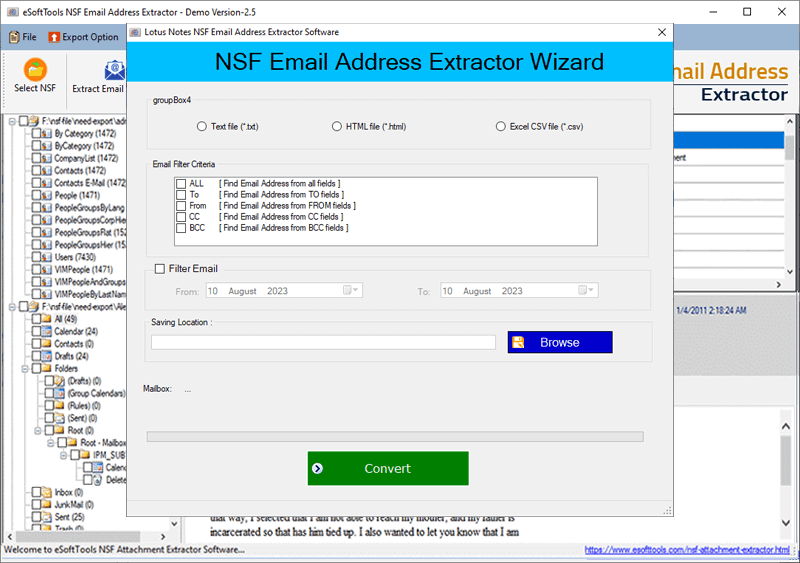
- Finally, click on Convert and start extracting email addresses from NSF files.

Conclusion
Extract email addresses from NSF files can be an important task, especially when migrating from IBM Lotus Notes to other email platforms or gathering/managing email address information. The method mentioned above will simplify the email address extraction process by offering various customization options. Try the demo version of eSoftTools NSF Email Address Extraction now for a quick analysis.
FAQ
Where will this software save the email addresses after extracting them from NSF files?
Yes, this software provides the option to save email addresses in 3 different types of files – TXT, HTML, and CSV file formats.
Can this tool extract email addresses from specific header fields of NSF file emails?
Users have the option to select email header fields to extract email addresses, such as “TO”, “From”, “CC”, “BCC”, or “ALL”, including specific email addresses.
Will this software be able to extract email addresses from NSF files of older versions of Lotus Notes?
You can easily extract email addresses from NSF files of all versions of HCL/IBM/Lotus Notes, including 10.0.1, 9.0.1, 9.0, 8.5, 8.0.2, 7.0, 6.5, 6.0, and earlier.

No Comments yet!