Do you have a problem opening NSF files on your computer? Then read this blog. We have provided a professional solution for accessing and opening NSF files on your computer and written an automated method on how to import Lotus Notes emails to Gmail account.
NSF files run on the IBM Lotus software, which is now maintained by HCL. However, Gmail is a cloud-based application that can be used anywhere in the world with the help of the Internet. You can access emails on Gmail anywhere in the world with the help of the internet.
Why import Lotus Notes Emails to Gmail Account?
- Lotus Notes Emails are run on HCL Notes, which is complex software, whereas Gmail has an easy graphical interface that can be used by anyone.
- If you have old NSF files on your computer and you don’t have any software installed on your computer then you can migrate these NSF files to Gmail and read your emails.
- If HCL Notes corrupts and stops working, then you can migrate files to Gmail and use them.
Also Read: How to Convert NSF to EML?
How to convert NSF to MBOX with email & attachments?
Method to import Lotus Notes Emails to Gmail Account
You can convert Lotus Notes Emails to Gmail Account with the help of eSoftTools Lotus Notes to Gmail migrator Software. You can transfer single and multiple NSF files at a time. In the preview panel, you can see the files and folders of NSF files in a tree format. You can check and uncheck the NSF files that you want to migrate to your Gmail account.
Steps to use Professional Software
- Download and install eSoftTools Lotus Notes to Gmail migrator Software.
- Choose an NSF file and single and multiple NSF files at a time.
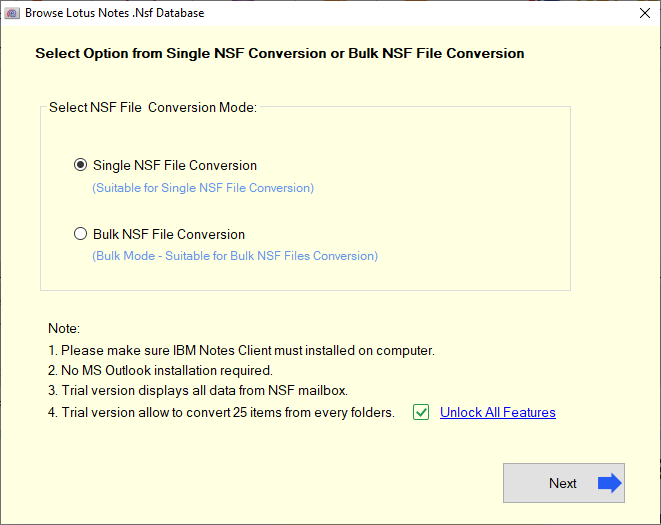
- Automatically, it scans NSF file,s and in the preview panel, you can see the files and folders of NSF files.
- Check the files and folders you want to import to Gmail in the side panel.

- Now hit the ‘Import to Gmail’ option.
- Now, enter your User ID and Password for Gmail.

- Press the ‘Connect & Import’ button to convert and migrate NSF files to Gmail.
Conclusion
You can easily migrate Lotus Notes files to a Gmail account with the help of eSoftTools NSF to Gmail converter Software. Technical and non-technical people can use this software easily. You can try the demo version of this software in which you can convert 25 files from each folder of an NSF file and come to know the features of this software.

No Comments yet!