The advanced features and easy-to-use interface of Outlook have made it so popular that it is used in both the MAC operating system and Windows operating systems. Sometimes users need to migrate from Outlook for MAC to Outlook for Windows; therefore, we need to convert OLM to PST files. In this blog, we have written an automated method to convert OLM to PST files.
Overview
In the world of email communication, Outlook has become one of the choices of many users. Outlook has advanced features and a smart user interface that have made it a great choice for users. In some cases, users want to shift from Outlook for the MAC operating system to Outlook for the Windows operating system. For the migration, we have to convert OLM to PST files.
Why convert OLM to PST?
- As we know, the OLM file format is used in Outlook for the MAC operating system and the PST file format is used in Outlook for the Windows operating system. If we need to migrate from MAC Outlook to Windows Outlook, we need to convert OLM to PST files.
- If the user switches from the MAC operating system to the Windows operating system, then the user needs to convert from Outlook for MAC to Outlook for Windows.
- To recover data from orphaned OLM files, we need to convert them to PST files.
Best software to convert OLM to PST
The best software to convert OLM to PST is the eSoftTools OLM to PST converter software. This tool is recommended by various IT industry experts to convert OLM to PST files. This tool directly converts OLM files to PST files.
Key features
- It converts single and multiple OLM files in bulk at a time.
- It easily exports emails, contacts, and calendars from OLM to new PST and existing PST files.
- It saves the OLM files separately to different file formats like MSG, MBOX, EML, EMLX, NSF, etc.
- It has the ability to transfer OLM contacts and calendars to ICS and vCard.
- It has the ability to export OLM to MBOX for Thunderbird, Apple Mail, etc.
- It enables you to convert OLM to TGZ for Zimbra, a desktop client.
- It enables you to split large PST files into smaller PST files with the split feature.
- Provides the feature of email filtering and a naming convention feature to filter emails by Date and save emails with different and unique names.
- Allows conversion of OLM files to any file format without any size restrictions.
- Smartly converts OLM files to PST files without any file size restriction.
- It is compatible with all editions of the Windows Operating System such as Windows 11, 10, 8.1, 8, 7 and below versions.
Also Read: How to Convert EMLX to MBOX File?
Stepwise procedure to convert OLM to MBOX
- Download and install the eSoftTools OLM to PST converter software on your system.
- Open the software and click the Select OLM button to add OLM files in the software.
- Choose from the two options
- Single OLM file conversion- To add single OLM files in the software.
- Bulk OLM file conversion– To add multiple OLM files in the software.
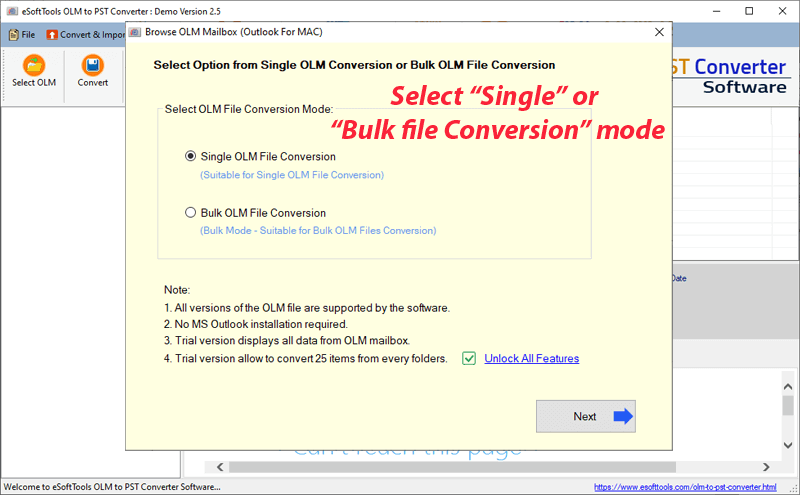
- Click the Start Scanning button to add OLM files to the software.
- Get a preview of OLM files, emails, contacts, calendars, etc in the tree structure and select the OLM files and folders to convert to other file formats.
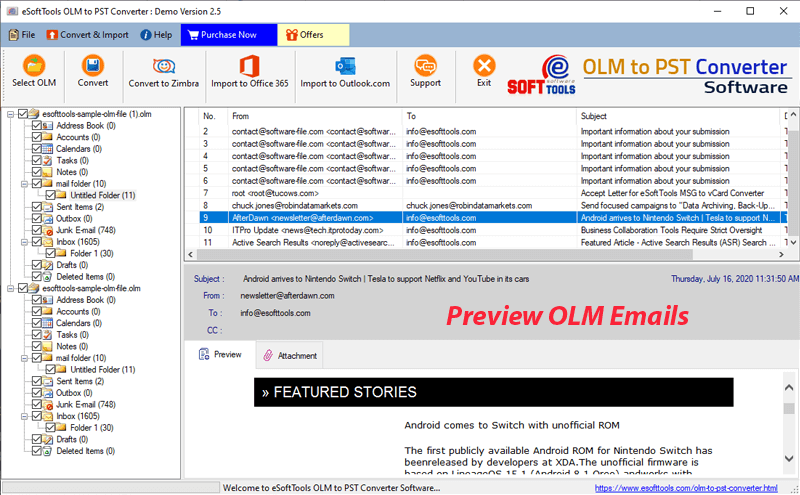
- Click on the Convert button on the menu bar and enter the conversion window.
- Choose the required file format for conversion and apply the email filtering and naming convention feature if you want.
- Browse the location where you want to save the resultant file.
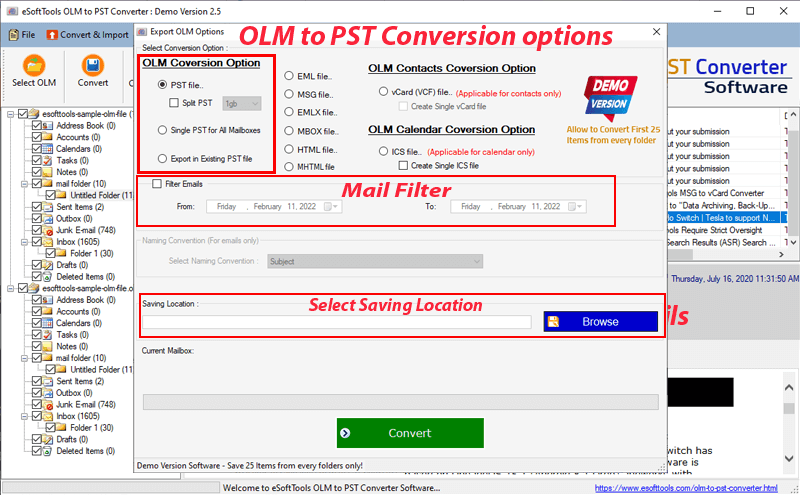
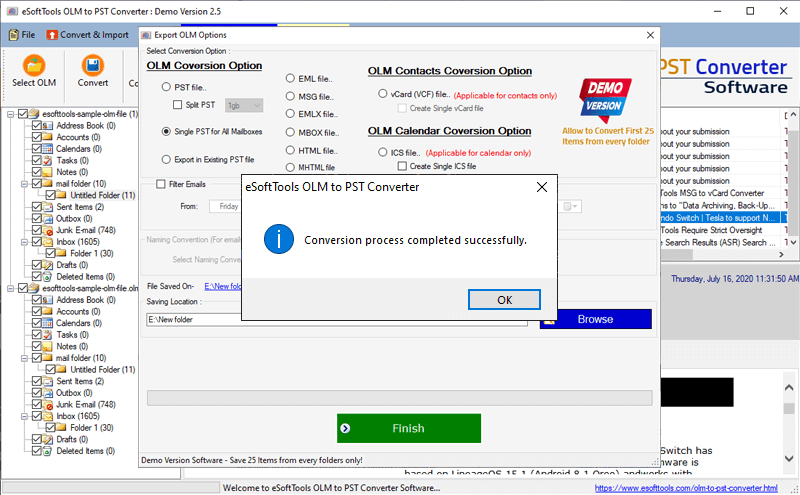
- Finally hit the Convert button and start the conversion process to convert OLM to PST files.
Conclusion
In this blog, we have explained the automated method for converting OLM files to PST files. It is the easiest and most reliable method to convert OLM files to PST files. This tool supports OLM files of any version.

No Comments yet!