Are you looking to open EML files in Windows 11, 10, 8.1, 8, 7, and earlier operating systems without an email client? If yes, then you landed on the right page. In this blog, you will learn about the automated method to open EML file without Email Client.
EML file- Introduction
EML file stands for electronic mail. It is a file format that stores email messages, attachments, headers, metadata, etc. These files are most popular with working professionals as they are widely used and easily handled. This file format is widely supported by email clients such as Microsoft Outlook, Windows Live Mail, Apple Mail, Mozilla Thunderbird, Windows Mail, and Microsoft Outlook Express.
Sometimes in a Windows Operating System, an email client that supports EML files is not available and we have to use a third-party application to open EML file.
The best method to view EML files without an Email client
The best method to view EML files without an Email client is to use eSoftTools EML Viewer Software. This is robust and advanced software that allows you to open and view EML files without any third-party software.
Also Read:- Free EML File Viewer Download
Key Features
- Open EML file without email client with very easy steps.
- It allows you to access EML/EMLX files and view emails with attachments from all email clients.
- You can preview emails on a separate screen by clicking twice on the emails.
- View emails with complete information and meta properties like To, cc, bcc, subject, and body.
- It allows the addition of single and multiple EML files in the software at a time.
- It supports and opens EML files of email clients such as Microsoft Outlook, Outlook Express, Windows Live Mail, Mozilla Thunderbird, etc.
- It has a graphical user interface that can be accessed by anyone with or without a technical background.
- In the above editions of this software, like EML Viewer Pro, you can convert EML to 10+ other file formats such as MSG, MBOX, PST, HTML, MHTML, vCard, ICS, etc.
- In EML Viewer Pro+, you can migrate EML files to cloud-based applications such as Office 365, Outlook.com, Gmail, YahooMail, IMAP, etc.
- It is compatible with all editions of Windows operating systems such as Windows 11, 10, 8.1, 8, 7, XP, Vista, and earlier versions.
Steps to open and view EML/EMLX files on Windows without email client
- Download and install the eSoftTools EML Free Viewer software on your system.
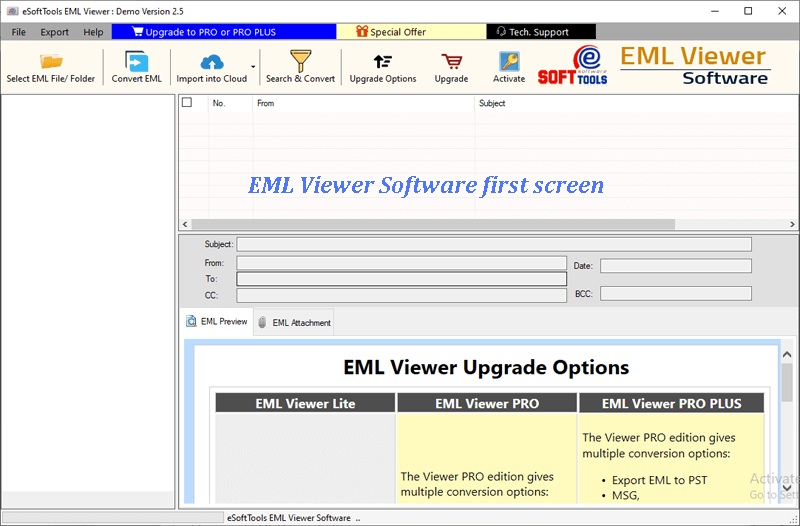
- Click on the Select EML file/folder button in the above menu bar.
- Choose the file-adding mode from the two options-
- Folder Mode: Add a complete EML folder containing EML files and subfolders.
- File Mode: You can add a single EML file to view its content at a time.

- You can preview the files/folders of the EML file in the preview panel in a tree structure and select the files to view in the preview panel.

- Click on each email and get a preview of the email and its attachments in the preview panel.
Conclusion
In this blog, we have covered the automated method by which you can open EML files in Windows without an email client installed in your system. In the demo version, you can open 25 EML files and get a preview of them. If you like the working of the software you can purchase the software.

No Comments yet!