Many email clients like Mozilla Thunderbird, Sea Monkey, Opera Mail, etc use MBOX files that save all emails in text format in a single file. These desktop email clients have file size issues so users opt to migrate MBOX files to cloud-based applications like Yahoo Mail. In this blog, we have described an automated method to Import MBOX File to Yahoo Mail With Attachments.
What is an MBOX file?
An MBOX file (Mailbox file) is a standard email storage format that contains multiple email messages in a single file. It is widely used by various email clients, including Mozilla Thunderbird, Apple Mail, Eudora, etc. It stores email messages in plain text.
What is Yahoo Mail?
Yahoo Mail is a popular web-based email service provided by Yahoo, offering users a free and premium email experience. It includes features like cloud storage, spam protection, and customizable themes.
Reasons to Import MBOX File to Yahoo Mail With Attachments
- Yahoo Mail is a cloud-based application that allows access to emails from anywhere and anytime with the help of the Internet.
- You don’t need to manage multiple email clients because all the emails are kept in one place.
- Moving files to Yahoo Mail is a good option for data backup and archive and prevents data loss due to hard drive failures and accidental deletion.
- Once you migrate the MBOX file to Yahoo Mail you can easily share and forward emails.
Smart solution to Import MBOX File to Yahoo Mail With Attachments
There are manual methods also available to Import MBOX File to Yahoo Mail With Attachments but they are complex and require technical expertise to migrate. The manual method also doesn’t guarantee successful migration and there are chances of data loss. In contrast, you can use eSoftTools MBOX Converter software to easily migrate MBOX files to Yahoo Mail in a few clicks. It also provides additional features that come with the migration process.
Also Read:- How to Export emails from MBOX to Office 365?
Features
- You can load single and multiple MBOX files in this software at a time and you can also choose to auto-detect MBOX files from your system.
- You can preview the files and folders of the MBOX file in the preview panel.
- It also provides the feature of email filtering through which you can filter emails according to date only you have to give the starting date and ending date.
- It allows to conversion of MBOX files to other file formats like PST, MSG, EML, EMLX, NSF, HTML, etc.
- Allows to add MBOX files of any size without any size restrictions.
How to import MBOX to Yahoo Mail?
- Download and install eSoftTools MBOX Converter software in your system.
- Open and click the ADD File/ Folder button of the software at the start-up screen.

- Choose from the three options to load MBOX files into the software
- Single MBOX file: You can add a single MBOX file to the software.
- Multiple MBOX files: You can load multiple MBOX files in the software.
- Auto-detect MBOX file: The software will automatically detect MBOX files inside your system and load MBOX files in the software.
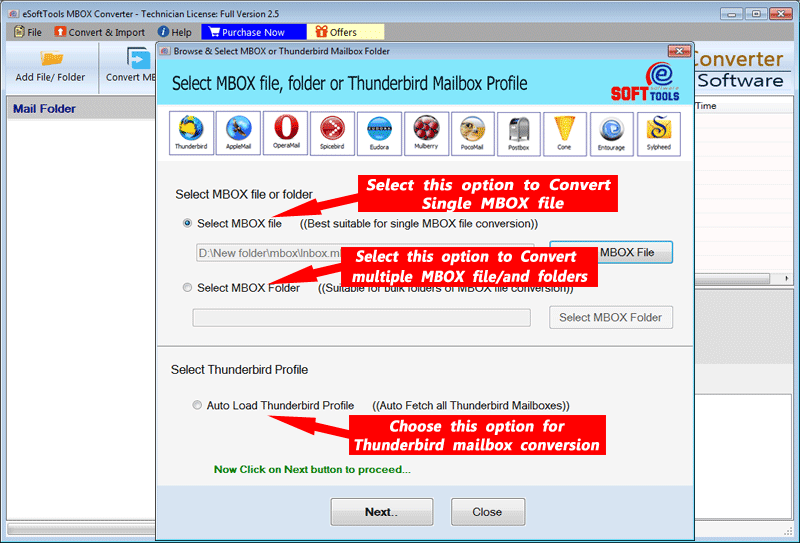
- After loading MBOX files in the software, you can click the Next button.
- In the preview panel, you can view MBOX files/folders and select the MBOX files/folders to be migrated and Click on the Import to Cloud button.

- choose the option Import to Yahoo Mail from the list of options.

- Now enter your Yahoo Mail Login details like email address and password and press the Authenticate Login button.
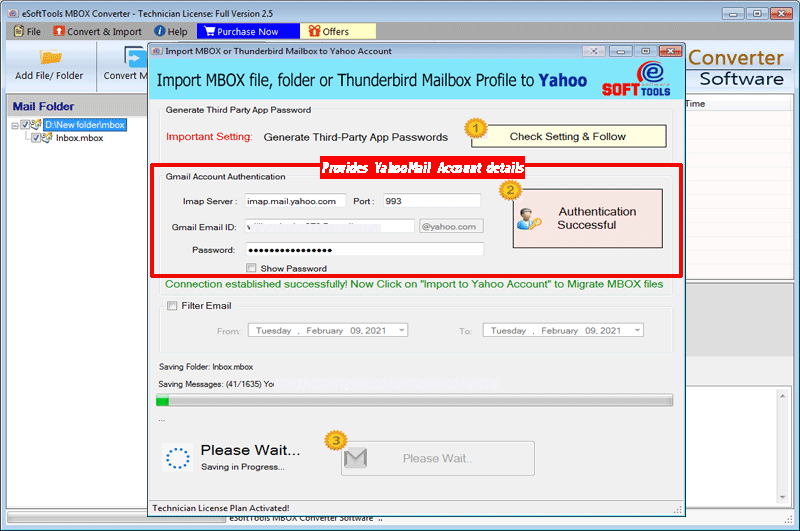
- After login, you can choose the Mail filter to filter emails according to the Date with the Date Range( From and To).
- At last click on the Convert button and start the migration process will be started.
Conclusion
Import MBOX File to Yahoo Mail With Attachments is needed in some scenarios. We have provided an automated solution to migrate MBOX to Yahoo Mail. This is the most advanced and reliable solution and you can use the demo version of the software to give a try to the software.

No Comments yet!